A UX audit and redesign of an existing SaaS sign-up flow
Streamlining the sign up experience
Reducing friction by reorganising steps around decision points

A UX audit and redesign of an existing SaaS sign-up flow
Streamlining the sign up experience
Reducing friction by reorganising steps around decision points

A UX audit and redesign of an existing SaaS sign-up flow
Streamlining the sign up experience
Reducing friction by reorganising steps around decision points

The following case study was adapted from a real product. Visuals and pricing are modified, but the original issue remains the same: the sign-up process had more steps than it needed.
The goal was to shorten the path, support the task, and remove screens that were not necessary.
My Role:
UI/ UX Design, Flow Restructuring, Information Architecture, Prototyping, User interviews
Platform:
Responsive Web
My Role:
UI/ UX Design, Flow Restructuring, Information Architecture, Prototyping, User interviews
Platform:
Responsive Web
My Role:
UI/ UX Design, Flow Restructuring, Information Architecture, Prototyping, User interviews
Platform:
Responsive Web
01 - The Problem
The sign-up flow was confusing and frustrating for both free and professional users.
Instead of a clear path, there were too many steps and popups which slowed them down.
Buying and managing apps was also tied to the sign-up flow, but the process felt broken. Users had trouble understanding account tiers, had to pass through pages that didn’t add value, and were forced to adjust settings like “number of runs” before they could subscribe.
Even after payment, the flow left them unsure of where to find the apps they had just bought. What should have been a simple process instead felt slow, complicated, and unclear.
01 - The Problem
The sign-up flow was confusing and frustrating for both free and professional users.
Instead of a clear path, there were too many steps and popups which slowed them down.
Buying and managing apps was also tied to the sign-up flow, but the process felt broken. Users had trouble understanding account tiers, had to pass through pages that didn’t add value, and were forced to adjust settings like “number of runs” before they could subscribe.
Even after payment, the flow left them unsure of where to find the apps they had just bought. What should have been a simple process instead felt slow, complicated, and unclear.
01 - The Problem
The sign-up flow was confusing and frustrating for both free and professional users.
Instead of a clear path, there were too many steps and popups which slowed them down.
Buying and managing apps was also tied to the sign-up flow, but the process felt broken. Users had trouble understanding account tiers, had to pass through pages that didn’t add value, and were forced to adjust settings like “number of runs” before they could subscribe.
Even after payment, the flow left them unsure of where to find the apps they had just bought. What should have been a simple process instead felt slow, complicated, and unclear.
02 - User Feedback
I mapped out the current sign-up flow for both free and professional tiers, timing users and getting their opinions. They provided feedback on confusing steps, unclear instructions, and frustration with the payment process.
02 - User Feedback
I mapped out the current sign-up flow for both free and professional tiers, timing users and getting their opinions. They provided feedback on confusing steps, unclear instructions, and frustration with the payment process.
02 - User Feedback
I mapped out the current sign-up flow for both free and professional tiers, timing users and getting their opinions. They provided feedback on confusing steps, unclear instructions, and frustration with the payment process.
Audit and User Feedback Findings
Too many screens
Confusion over account types
Confusion over the user flow because they were shown pages that they didn’t have enough context to know why they were shown those pages
Did not know how to buy an app
Even after buying an app, users don’t know how to launch the app they just bought
Audit and User Feedback Findings
Too many screens
Confusion over account types
Confusion over the user flow because they were shown pages that they didn’t have enough context to know why they were shown those pages
Did not know how to buy an app
Even after buying an app, users don’t know how to launch the app they just bought
Audit and User Feedback Findings
Too many screens
Confusion over account types
Confusion over the user flow because they were shown pages that they didn’t have enough context to know why they were shown those pages
Did not know how to buy an app
Even after buying an app, users don’t know how to launch the app they just bought
Conclusion
Cut down on the number of screens
Have a way to inform users about the pricing plans (Assume that users have never seen the pricing page)
Research and revamp the app management/buying screen flow
Always make it clear to the user which stage are they currently in
Have a clear “next steps” for the user to know what to do
Conclusion
Cut down on the number of screens
Have a way to inform users about the pricing plans (Assume that users have never seen the pricing page)
Research and revamp the app management/buying screen flow
Always make it clear to the user which stage are they currently in
Have a clear “next steps” for the user to know what to do
Conclusion
Cut down on the number of screens
Have a way to inform users about the pricing plans (Assume that users have never seen the pricing page)
Research and revamp the app management/buying screen flow
Always make it clear to the user which stage are they currently in
Have a clear “next steps” for the user to know what to do
03 - What I changed
I reorganised the flow around three decisions:
Pick a plan
Create an account
Start using the product
03 - What I changed
I reorganised the flow around three decisions:
Pick a plan
Create an account
Start using the product
03 - What I changed
I reorganised the flow around three decisions:
Pick a plan
Create an account
Start using the product
Results:
Screens reduced by ~45%
From 11 to 6 screens
~28% faster sign up times
From 2m 5s to 1m 30s
04 - Before/After
Before
After


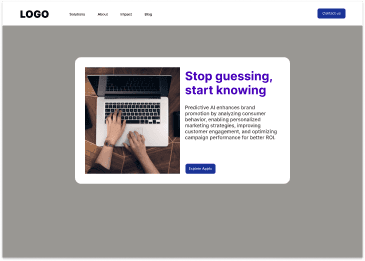
The initial sign up screen that has one CTA button.


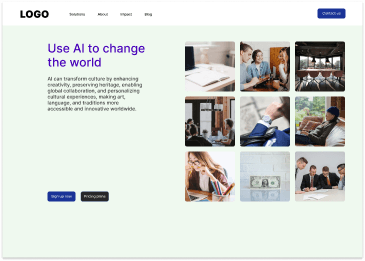
Another CTA screen that asks the user to either sign up or look at the pricing plans.
These first two screens are non-changeable; the product owner did not want to remove them.
Another CTA screen that asks the user to either sign up or look at the pricing plans.
These first two screens are non-changeable; the product owner did not want to remove them.
Another CTA screen that asks the user to either sign up or look at the pricing plans.
These first two screens are non-changeable; the product owner did not want to remove them.


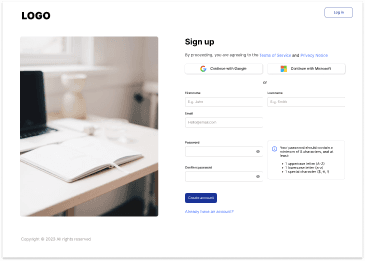
After clicking Sign up, the user fills in their details.
If the user wants to sign up as a professional user, they cannot do so at this stage.
After clicking Sign up, the user fills in their details.
If the user wants to sign up as a professional user, they cannot do so at this stage.
After clicking Sign up, the user fills in their details.
If the user wants to sign up as a professional user, they cannot do so at this stage.


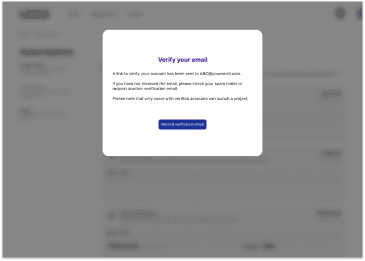
User goes to a verify email screen.


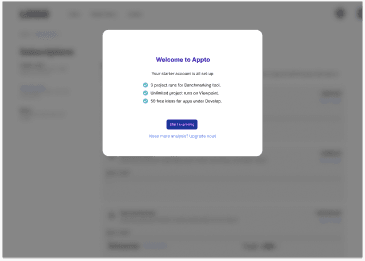
After verifying, there is a welcome popup about the starter account's benefits.


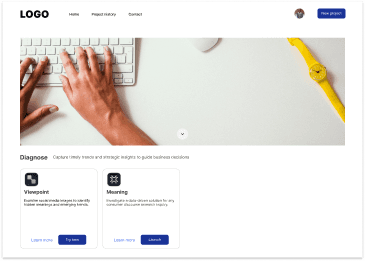
The next screen is an app selection screen.
This is a ‘lost path’, because the user doesn’t know what to do next.
The next screen is an app selection screen.
This is a ‘lost path’, because the user doesn’t know what to do next.
The next screen is an app selection screen.
This is a ‘lost path’, because the user doesn’t know what to do next.


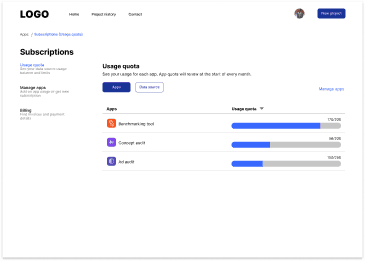
The user might somehow go to the subscriptions page from the user icon.


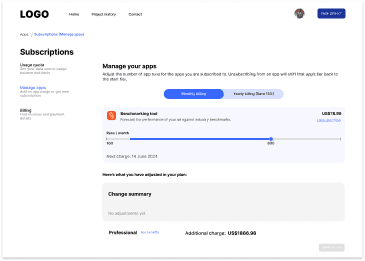
They might go to the manage apps page and increase the quota they want for their app.
After increasing the quota, they will need to check out.
They might go to the manage apps page and increase the quota they want for their app.
After increasing the quota, they will need to check out.
They might go to the manage apps page and increase the quota they want for their app.
After increasing the quota, they will need to check out.


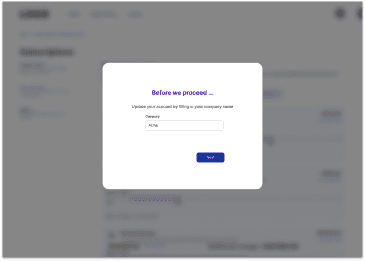
Because the user did not sign up as a professional user (and was not given the choice to), there is a popup to ask the user for their company’s name.


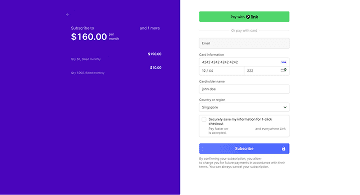
. After inputting in their company’s name, they are directed to the Stripe payment page.


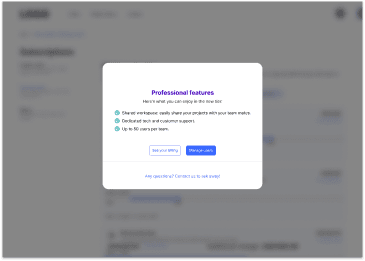
. After payment, they will see what they are entitled to for the professional plan.
This is another ‘lost path’, because the user has bought the app, but there is no “launch app” option.
. After payment, they will see what they are entitled to for the professional plan.
This is another ‘lost path’, because the user has bought the app, but there is no “launch app” option.
. After payment, they will see what they are entitled to for the professional plan.
This is another ‘lost path’, because the user has bought the app, but there is no “launch app” option.


The initial sign up screen that has one CTA button.


Another CTA screen that asks the user to either sign up or look at the pricing plans.
These first two screens are non-changeable; the product owner did not want to remove them.
Another CTA screen that asks the user to either sign up or look at the pricing plans.
These first two screens are non-changeable; the product owner did not want to remove them.
Another CTA screen that asks the user to either sign up or look at the pricing plans.
These first two screens are non-changeable; the product owner did not want to remove them.


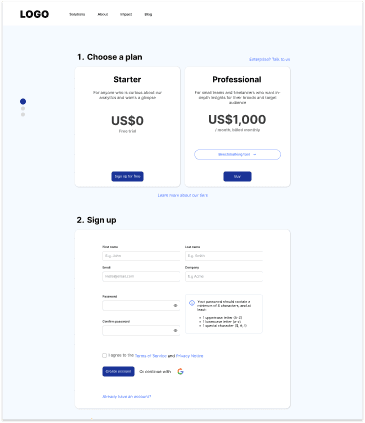
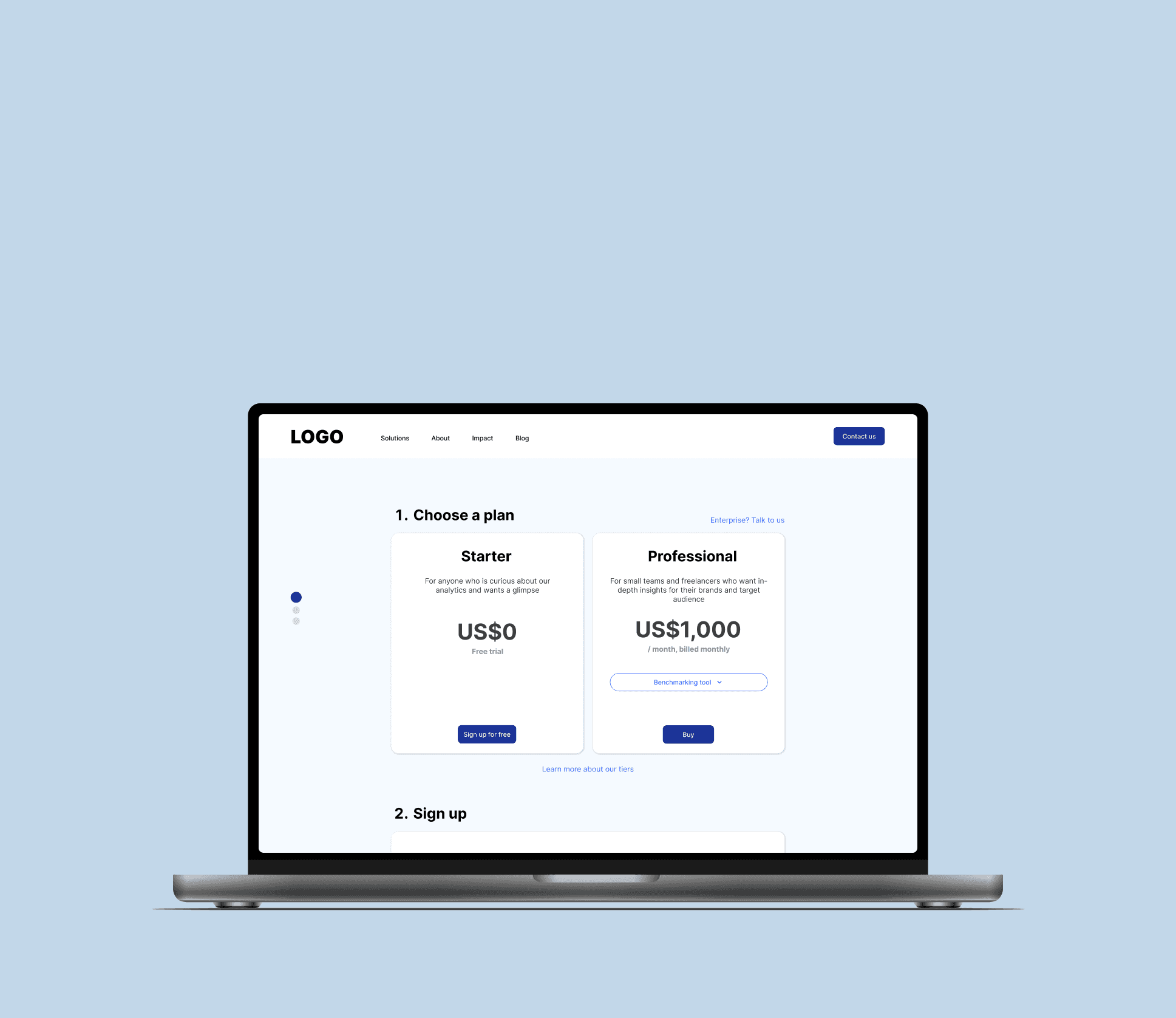
Whether the user clicks on Sign up or pricing plans, they go to the first step, which lets the user choose which plan they want to sign up under.
Why:
Step two of the process will change depending on which plan the user chooses.
Whether the user clicks on Sign up or pricing plans, they go to the first step, which lets the user choose which plan they want to sign up under.
Why:
Step two of the process will change depending on which plan the user chooses.
Whether the user clicks on Sign up or pricing plans, they go to the first step, which lets the user choose which plan they want to sign up under.
Why:
Step two of the process will change depending on which plan the user chooses.


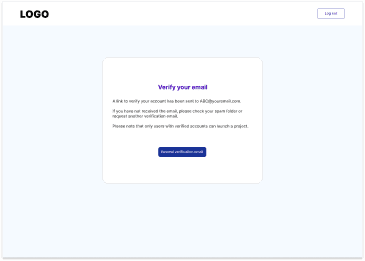
User goes to a verify email screen.


After verifying, the user goes to the Stripe payment screen. After payment, the screen auto-redirects to the third screen.


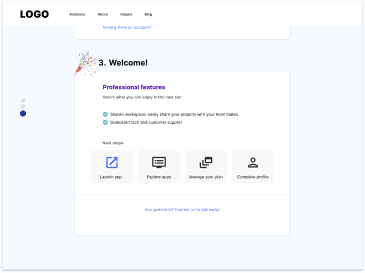
The final step congratulates the user on finishing the sign up, shows the features they are entitled to and the next steps they can take.
Why:
This final step gives the user ‘closure’ to the end of the process and gives them clarity on what they can do next.
The final step congratulates the user on finishing the sign up, shows the features they are entitled to and the next steps they can take.
Why:
This final step gives the user ‘closure’ to the end of the process and gives them clarity on what they can do next.
The final step congratulates the user on finishing the sign up, shows the features they are entitled to and the next steps they can take.
Why:
This final step gives the user ‘closure’ to the end of the process and gives them clarity on what they can do next.
05 - Final Design
Steps with descriptions to inform the user which step they are in
Stepper widget to give the user a sense of progress that they are going through a series of steps
Description of tiers so user knows which one they would like to choose without needing to go through the pricing plan page
Next steps they can take, with Launch app as the first step they can take at the end of the process


If they are an Enterprise user, they can click on the link to directly contact the team.
Since Enterprise users generally do not go through this route, I’ve de-emphasized this tier and placed it as a text link.
If they are an Enterprise user, they can click on the link to directly contact the team.
Since Enterprise users generally do not go through this route, I’ve de-emphasized this tier and placed it as a text link.
If they are an Enterprise user, they can click on the link to directly contact the team.
Since Enterprise users generally do not go through this route, I’ve de-emphasized this tier and placed it as a text link.
If the user decides to buy an app, I incorporated the company text field into the sign up form.
If the user signs up via Google, they would have to input their company name when they first start using the app.
There is a complete profile link at the end step to let user easily do that.
If the user decides to buy an app, I incorporated the company text field into the sign up form.
If the user signs up via Google, they would have to input their company name when they first start using the app.
There is a complete profile link at the end step to let user easily do that.
If the user decides to buy an app, I incorporated the company text field into the sign up form.
If the user signs up via Google, they would have to input their company name when they first start using the app.
There is a complete profile link at the end step to let user easily do that.
Clarity on the tier benefits
06 - Reflection
The proposed changes – reducing the number of screens from 11 to 6 and cutting the sign-up time by ~28% gave users a smoother, more intuitive user experience.
This project focused on simplifying the task, not adding features. By reframing the sign-up as three decisions instead of eleven screens, the flow became shorter and easier to complete, with fewer points where users had to stop and think.
While the management did not move on with this flow because of shifting priorities, I felt that this case study was a good example of how user feedback and testing can help improve a process.
If I were to do this process over again, I would push for more users to help with feedback.
06 - Reflection
The proposed changes – reducing the number of screens from 11 to 6 and cutting the sign-up time by ~28% gave users a smoother, more intuitive user experience.
This project focused on simplifying the task, not adding features. By reframing the sign-up as three decisions instead of eleven screens, the flow became shorter and easier to complete, with fewer points where users had to stop and think.
While the management did not move on with this flow because of shifting priorities, I felt that this case study was a good example of how user feedback and testing can help improve a process.
If I were to do this process over again, I would push for more users to help with feedback.
06 - Reflection
The proposed changes – reducing the number of screens from 11 to 6 and cutting the sign-up time by ~28% gave users a smoother, more intuitive user experience.
This project focused on simplifying the task, not adding features. By reframing the sign-up as three decisions instead of eleven screens, the flow became shorter and easier to complete, with fewer points where users had to stop and think.
While the management did not move on with this flow because of shifting priorities, I felt that this case study was a good example of how user feedback and testing can help improve a process.
If I were to do this process over again, I would push for more users to help with feedback.
Ron Ang | 2025 | Crafted with
, powered by Framer
Ron Ang | 2025 | Crafted with
, powered by Framer
Ron Ang | 2025 | Crafted with
, powered by Framer